General 4


General 4 Tab
The General 4 screen is used to define processing requirements for options relating to Branch selection, reporting details, SLN segment processing, line consolidation as well as other options relating to handling information in the 850 translation document.
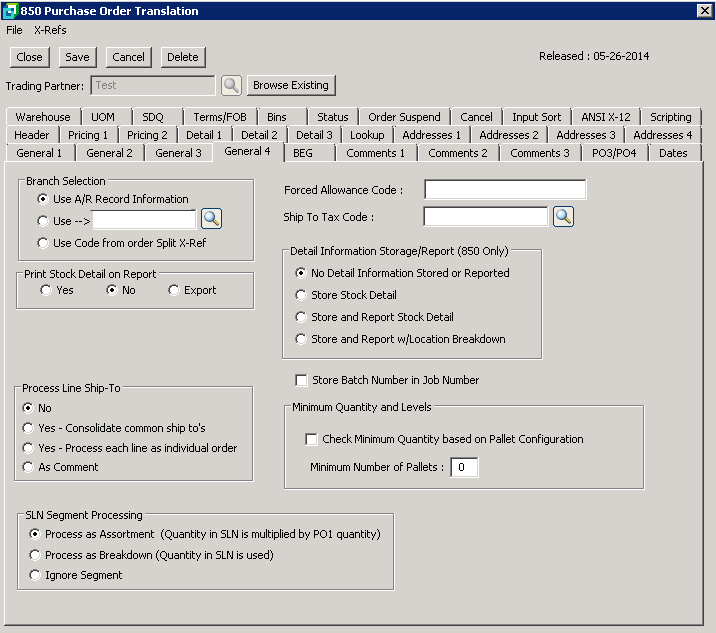
The following table outlines the prompts/options available when accessing this screen:
Branch Selection |
|
|
Select to use the default Branch from the A/R customer record |
|
Browse to select the A/R Branch to be used. |
|
Select to use the code from "Order Split Information" in Cross-Reference Maintenance. |
Print Stock Detail on Report |
|
|
Select to include the stock item detail on the normal import report. |
|
Select to not include stock item details on the norm import report. |
|
Select to export the Import Report using comma delimited file. |
Process Line Ship-To |
|
|
Select No as the default. |
|
Select this option to consolidate common Ship To's based on N104 Location ID Numbers. |
|
Select to process each line as an individual order. |
|
Select to process the information to a comment line on the Sales Order. |
SLN Segment Processing Segment relates to Sub line Item Details. Select the required process or chose to ignore the SLN Segment. |
|
|
|
|
|
|
|
Forced Allowance Code: |
Select this option to add an allowance to the Sales Order that is not on the incoming file, (i.e. handling fee). The code is set up in Cross Reference Maintenance. |
Ship To Tax Code: |
Enter or browse Extended Tax codes and select the applicable tax code. Note: For this option to work you need to ensure that SYSPRO Setup the Tax Option is set to "USA Tax by Advanced Geocodes". This option is used when using EDI import addresses. |
Detail Information Storage/Report (850 Only) This option is used to define whether or not Stock Code Details are to be stored or reported per location. |
|
|
Select if stock item details are not to be stored or reported (Default) |
|
Select to store stock item details |
|
Select to store and report the stock item details on the standard import report |
|
Select to store and report stock item details with the location breakdown on the standard import report. |
|
Select to store the Batch number in the Job Number |
Minimum Quantity and Levels This links to the Stock Code/Carton/Pallet Dimension Cross Reference. |
|
|
Select for the system to validate the minimum quantities based on the pallet configuration as set in the cross reference. |
Minimum Number of Pallets: |
Enter the minimum number of pallets allowed for the total order. |


