BEG


BEG Tab
The BEG (Beginning) screen is used to define the elements contained in the BEG segment. The type of information defined relates to order type; purchase order, release and contract numbers.
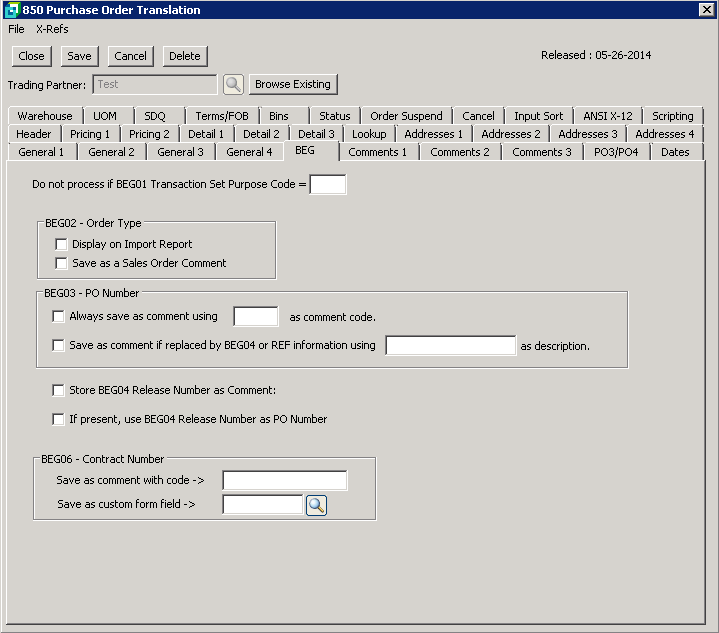
The following table outlines the prompts/options available when accessing this screen:
Do not process if BEG01 Transaction Set Purpose Code = |
Am entry in this field which matches the BEG01 in the 850, will prevent the 850 from being processed. |
BEG02 - Order Type If the order type (e.g. BL for Blanket Orders or SA for Stand Alone Orders) is required,then select either or both of the following options. |
|
|
Select to display the Order Type on the Import Report |
|
Select if the order type is to be saved as the comment on the sales order. |
BEG03 - PO Number |
|
|
Select to always save the the PO Number as a comment on the sales order. Enter the required code in the box. Be careful of using "PO" as a code as there could be other comments similar such as PO Box. See also setting in comments screen in the EDI System Setup options. |
|
Enter the comment description to use in the field provided. |
|
Select to save the the Release Number from the BEG04 as a comment. This is a sequential number sent in on the BEG04 and is only used for blanket Sales Orders. |
|
If segment BEG04 Release Number is present, use the Release Number as the Customer's PO Number. |
BEG06 - Contract Number |
|
Save as comment with code -> |
Select to save the Contract Number as a comment with a specific code. Enter the required code. |
Save as custom form field -> |
Select to save the Contract Number in a custom form field on the sales order. Browse and select the custom form. |


