Addresses 1


Addresses 1 Tab
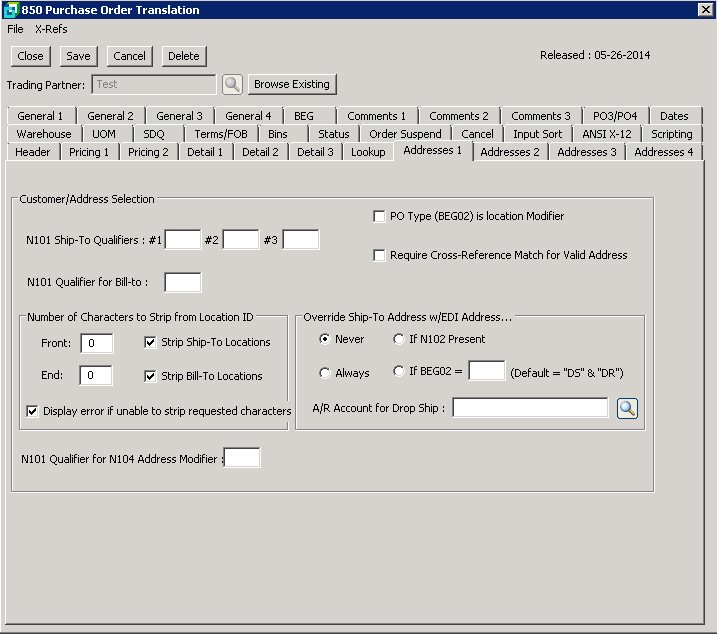
The following table outlines the prompts/options available when accessing this screen:
Customer/Address Selection |
|
N101 Ship-To Qualifiers: #1 |
The ship-to address for the qualifier selected will be placed in the header of the sales order. The ship-to location will be used by the system to determine the AR Customer account under certain circumstances such as when multiple ship-to addresses are used. |
N101 Qualifier for Bill-to: |
Leave this field blank to use the Bill-To address in the Customer Master. Otherwise, enter the EDI N101 code for the Bill-To address. |
|
If selected, the system will use the BEG02 as a location Modifier to set the ship-to location. |
|
Select to have the system match the address with the cross reference. |
Number of Characters to Strip from Location ID |
|
Front : |
|
End: |
|
|
|
Override Ship-To Address w/EDI address... You may want to override the Trading Partner Ship-to Address and use the address transmitted via EDI. If the N102 segment is present, the "Override Ship-To Address" selection will override the Trading partner address setup. Select one of the following: |
|
|
If selected, the trading partner ship-to will not be overwritten, and the ship-to will remain the trading partner ship-to. |
|
If selected, the trading partner ship-to will be overwritten using the information provided by the BEG02 qualifier. The N012 is usually used when a drop shipment address is required. |
|
If selected, the system ship-to will be overwritten by the address in the 850 |
|
Enter the BEG02 qualifier to use for the drop ship address. Default isl DS & DR, however, a qualifier of choice may be entered. |
A/R Account for Drop Ship: |
Enter or browse customers and select the applicable A/R Account number. |
N101 Qualifier for N104 Address Modifier: |
|


