Whse Transfers 1


Warehouse Transfers 1 Tab
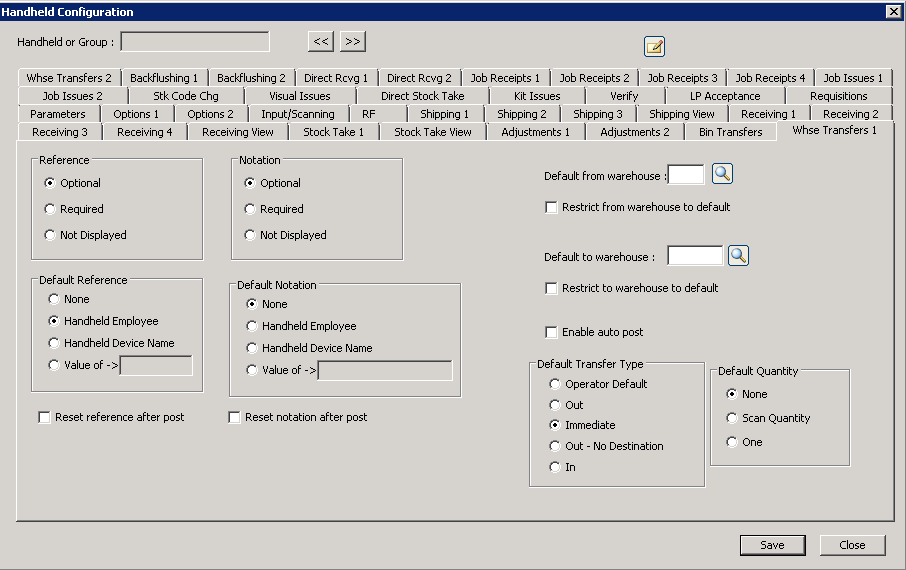
The following table outlines the prompts/options available when accessing this screen:
For direct inventory transactions, if used, SYSPRO will always ask for a reference code and a journal notation. These choices are optional and are up to the company as to whether they are needed.
For each transaction type (adjustment, receiving, job issue, etc.), the following options tell the handheld whether it should ask for the reference or notation, and secondarily whether a default value should be used.
The following two choices are tied together, but are actually independent choices. If a "default" option is selected, it affects the first set of choices. For example, "Optional" could be selected under "Reference", but if the "Handheld Employee" is selected under "Default Reference", then the employee name would be the default reference |
|
Reference |
|
|
The default will be displayed-- the operator can optionally change it, but the system will set no requirements as to whether data is input, or not. |
|
The information will be displayed and the operator can change it, however, something must be filled-in here for the system to allow for the information to be posted. |
|
The operator cannot change this; however even if this is selected, a default will still be sent if it is also selected. |
Default Reference |
|
|
No default reference |
|
Use the employee name |
|
Use the device name |
|
Use the entered, fixed value. |
|
The following two sets of choices related to "Notation" work in precisely the same manner as the "Reference" choices above. |
|
Notation |
|
|
|
|
|
|
|
Default Notation |
|
|
|
|
|
|
|
|
|
|
Default Warehouse: |
If no default warehouse is selected, the operator must enter a warehouse. It a default is selected, the default will appear but the operator is allowed to override it, if desired. |
|
If chosen, the warehouse will not be displayed on the screen to save time and screen space. This option can only be used if the above "Default Warehouse" is selected. |
|
In a typical handheld scanner sequence, multiple data is collected on multiple fields and the last button in the sequence is the "post" button. If this "Enable auto post" option is selected, when the last piece of information is entered and "post" is next in the sequence, the handheld will automatically perform a post without pressing the "post" button. |
Default Transfer Type |
|
|
|
|
|
|
|
|
|
|
|
Default Quantity Enables the handheld to automatically fill-in the quantity with some value when a stock code is entered. Note: this option can be used together with the "Enable auto post" to maximize efficiency for high-volume transactions, like serialized items, for example. |
|
|
No, do not fill-in a value. |
|
Automatically enter the quantity from scan code translation table when a stock code is entered. |
|
Automatically enter "1" as the quantity. |


