Trigger Program Setup


Trigger Program Setup Screen
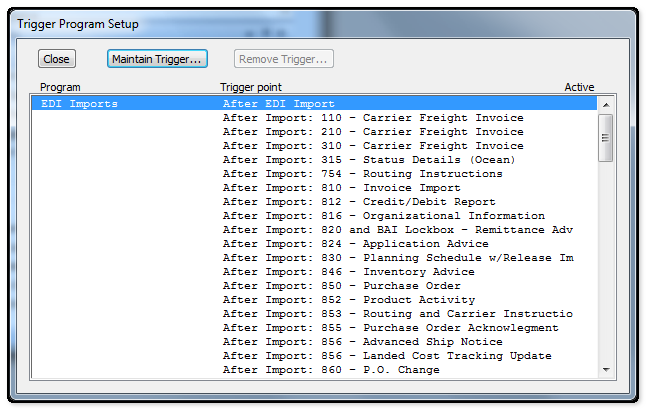
Highlight the trigger point required and then select the Maintain Trigger button to setup the trigger and define the program that is associated or invoked by the EDI event.
List View |
|
Program |
This indicates program in which a trigger is to be placed. There are four programs from which to choose: EDI Imports, EDI Exports, S/Order racking and Shipping System. Scroll down until the desired program is reached. |
Trigger Point |
The Trigger Point is the point at which the Trigger is to be activated e.g. After Import 850 or After Export of 810. Highlight the required Trigger point and select Maintain Trigger to add or edit a Trigger. |
Active |
A "Y" in this filed indicates that a particular Trigger Point is current active. |
Close Button |
This function is used to exit the Trigger Program Setup. |
Maintain |
Select this function to activate a new trigger or edit an existing trigger. First select the required program and then the required trigger point to activate or edit. |
Remove Trigger |
This function is used to inactivate a trigger. Highlight the trigger point to be inactivated and select the Remove Trigger button. |