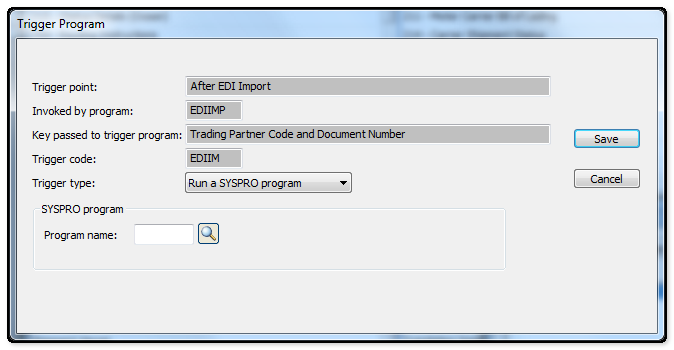
Use this riled to indication the mechanism that you want to activate when the event is triggered in SYSPRO:
Run a SYSPRO Program
Select this to run a SYSPRO program when this trigger is activated in SYSPRO.
Note: This function is not available if you are configuring triggers for e.net solutions.
Program Name
You use this field to indicate the name of the SYSPRO program you want to run when this trigger is activated.
Only one Syspro program can be assigned to a trigger point and it must be the last program that is run. If you need to run more than one Syspro program then you must use the Run and NetExpress program trigger type.
Once a trigger has been activated, and it is configured to run a Syspro program, the original program will not work properly if it attempts to interact with the Trigger system.
Run a NET Express Program
Select this to run a NetExpress program when this trigger is activated in SYSPRO
Program Name
You use this field to indicate the name of the NetExpress program you want to run when this trigger is activated.
In the absence of a full path specification, Syspro will attempt to locate the program in the standard program folder.
If the NetExpress program you select to run is a standard Syspro program that itself has been configured to invoke a trigger, then activating the trigger point causes a message to be displayed indicating that the program is already in use. You can ignore this message as the program associated with the trigger point will be activated when you close the message window.
Run any application
Select this to run an application when the trigger is activated in SYSPRO
Command Line
You use this field to indicate the executable file name of the application you want to launch.
Standard SYSPRO parameters/reserved words can be appended to the command line.
Start In
You use this field to indicate the full path name to where the executable file resides.
TIP: You can use reserved words:
Instead of displaying a generic message in the operator's Message Inbox, you can configure the trigger point to display more specific information.
This is achieved by using any of a number of reserved words or variables.
When configuring triggers in SYSPRO, you can use reserved words in the command line for the trigger type: Run any application and in the subject text line for the trigger type: Write to message inbox.
%Key
This indicates the key passed to the trigger program. The key can comprise more than one item of information (e.g. The trigger "After dispatch note line changed" passes both the Dispatch note number and the line number to the key. In other cases, only one item of information is passed to the trigger, such as the customer code or stock code).
Details of the information that is passed to the key is indicated at the Key passed to trigger program field when maintaining a trigger.
%Oper
This indicates the operator who performed the transaction that caused the trigger to be invoked.
%Coid
This indicates the company id in which the transaction occurred.
%code in the comm
This indicates the unique code assigned to the trigger point. It is used by developers and enables them to write a single program to handle multiple triggers generated from a single SYSPRO program.
The unique code generated by each trigger can be passed to the program written by the developer.
Sample usage:
When configuring the trigger point: After stock code added, you could specify the following at the subject field:
Stock code %key added by %oper in company %coid
where:
%key indicates the stock code that was added %oper indicates the operator who captured the details %coid indicates the company id in which the stock code as added
When the trigger is activated, the following sample message would be routed to the Message Inbox:
Stock code SAMPLE-30-CHARACTER-STOCK-CODE added by ADMIN in company 0.
Note:
The Message field of the Message Inbox can display up to 150 characters. Additional characters are truncated.
|