Adjustments 1


Adjustments Tab
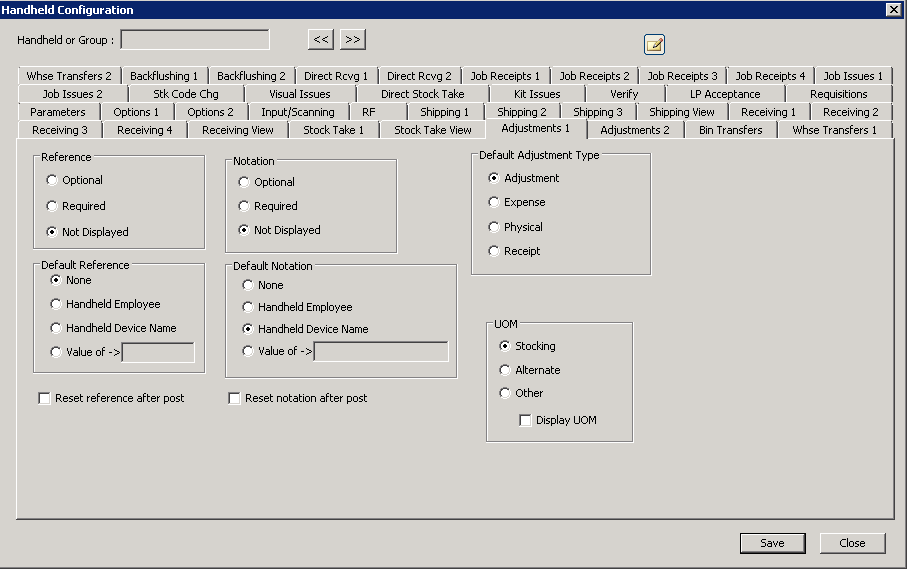
The following table outlines the prompts/options available when accessing this screen:
The following two choices are tied together, but are actually independent choices. If a "default" option is selected, it affects the first set of choices. For example, "Optional" could be selected under "Reference", but if the "Handheld Employee" is selected under "Default Reference", then the employee name would be the default reference. |
|
Reference |
|
|
The default will be displayed-- the operator can optionally change it, but the system will set no requirements as to whether data is input, or not. |
|
The information will be displayed and the operator can change it, however, something must be filled-in here for the system to allow for the information to be posted. |
|
The operator cannot change this; however even if this is selected, a default will still be sent if it is also selected. |
Default Reference |
|
|
No default reference |
|
Use the employee name |
|
Use the device name |
|
Use the entered, fixed value. |
|
The following two sets of choices related to "Notation" work in precisely the same manner as the "Reference" choices above. |
|
Notation |
|
|
|
|
|
|
|
Default Notation |
|
|
|
|
|
|
|
|
|
|
Default Adjustment Type Some modules allow for multiple types of transactions within that module, such as Adjustment, Expense, Physical, and Receipt. So if the user has the SYSPRO permissions to do such transactions, then those types are displayed in the form of radio button selections on the screen. and the following selection determines the default choice displayed at that time. If SYSPRO permissions are not set to allow the operator to perform these transactions, these options will not change that setting. So if a handheld operator does not see a transaction type displayed as noted here, SYSPRO permissions should be reviewed for that operator. Other SYSPRO restrictions may override these settings below. |
|
|
|
|
|
|
|
|
|
UOM Determines the Unit of Measure (UOM) to be used for all quantities entered by the handhelds. For example, many companies use "each" as the standard UOM; however, an entire warehouse might be setup in cases-- so rather than requiring the handheld operator to constantly do the conversion, an alternate UOM could be selected to use cases. This example would then use the convenient UOM for the handheld operator when doing adjustments, bin transfers, and so on. |
|
|
Use the stocking UOM |
|
Use the alternate UOM |
|
Use the other UOM |
|
Displays the unit of measure on the screen |


