Trading Partner Removal


Trading Partner Removal Screen
The purpose of the trading Partner Information Removal setup is to delete a Trading Partner or to delete documents attached to a Trading Partner.
To remove trading Partner Information, select
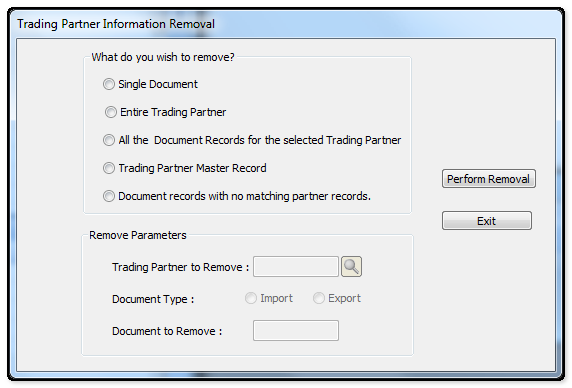
The following table outlines the prompts/options available when accessing this screen:
What do you wish remove? |
|
|
Select to remove a single Document (Import or Export) from the Trading Partner document records. Selecting this option will activate the Remove Parameter fields. Enter the trading Partner to remove, select the Document Type (Import or Export) and enter the number of document to be removed. |
|
Select to remove a Trading Partner Master record, including all document records associated wit the Trading partner. Selecting this option will activate the "Trading Partner to Remove" field under the Remove Parameters. Enter or browse and select the Trading Partner to be removed. |
|
Select this option to remove all the document records (Import and Export) associated with a specific Trading Partner. |
|
When selecting this option, the "Trading Partner to Remove" field under the Remove Parameters Enter or browse and select the Trading Partner to be removed. NOTE: This option should only be used if the master record being removed does not have documents associated with the Trading Partner; Otherwise, the Trading Partner will be removed, but the associated documents will remain in the files. If documents can be seen in a a List View where the Trading Partner is "UNKNOWN", then it is likely, this option was used while documents were attached to th STrading Partner. In this case, the following option "Document records with no matching partner records" can be used to remove the document. |
|
Select this option to remove all the document records (Import and Export) that are associated with an "Unknown" Trading Partner. Usually this scenario is caused by removing a Master record that had documents attached to the Trading Partner (Refer to "Trading Partner Master Record" option above). |
Remove Parameters |
|
Trading Partner to remove: |
Browse and select the Trading Partner to be removed or from who documents are to be removed from the system. |
Document type: |
Select whether the document to be removed is an incoming or outgoing document. This field is only activated if the "Single Document" option is entered above. |
Document to remove: |
This field is only available if "Single Document" is selected. Enter document number to be removed. This field is only activated if the "Single Document" option is entered above. |
Perform Removal Button |
Click the Perform Removal button to start the copy, after you have filled in all the parameters. |
Exit Button |
Select the Exit button to leave copy screen and return to the Support Programs Screen. |


