Trading Partner Copy


Trading Partner Copy Screen
The purpose of the Trading Partner Copy setup is to copy Trading Partner information and document mappings from one trading partner to another.
To copy Trading Partner Information, select
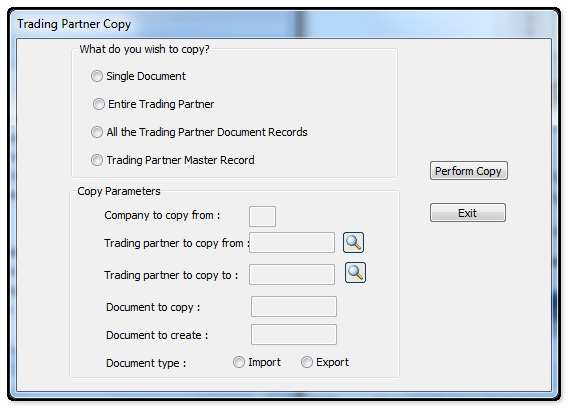
The following table outlines the prompts/options available when accessing this screen:
What do you wish copy? |
|
|
Select to copy a single document (either Import or Export) from one trading Partner to another trading Partner. |
|
Select this option to copy a Trading Parter Master record as well as all Document records (both Import and Export) from one Trading Partner to another Trading Partner. |
|
Select to copy all the Document records (both Import and Export) of one Trading Partner to another Trading Partner. |
|
Select to copy only the Master record from one Trading Partner to another Trading Partner. |
Copy Parameters |
|
Company to copy from: |
Enter the company code of the company from which information is being copied. |
Trading Partner to copy from: |
Enter or Browse and select the Trading Partner from who you are copying |
Trading partner to copy to: |
Enter or Browse and select the Partner to copy to. If this is a new Partner, a new Trading Partner record must be created containing the trading Partner number and name. |
Document to copy: |
Enter the document to copy |
Document to create: |
enter the new document to create |
Document type:
|
Select whether the document is an incoming or outgoing document. |
Perform Copy Button |
After the Parameters have been set, Select the "Perform copy" button to start the copy.. |
Exit Button |
Select the Exit button to leave copy screen and return to the Support Programs Screen. |


