Archive Files


Archived Files Screen
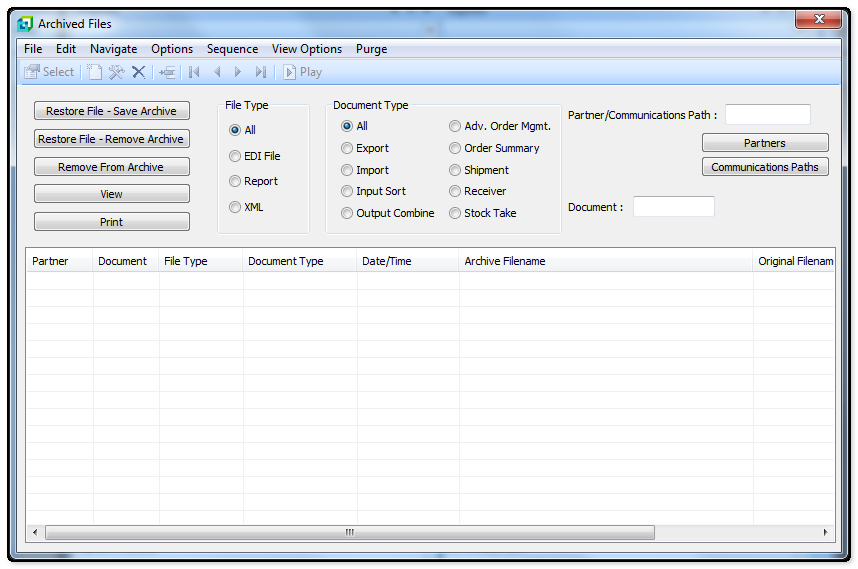
The following table outlines the prompts/options available when accessing this screen:
Restore File - Save Archive Button |
This will restore the file to the input file directory and retain the file in the archive directory. |
Restore File - Remove Archive Button |
This will remove the file from the archive directory when it is restored to the input directory |
Remove From Archive Button |
This will remove the file from the archive |
View Button |
This option is used if you want to open the file and view the content |
Print Button |
This option is used if you want to open the file and print the content. |
Document Type |
|
|
|
|
|
|
|
|
File Type |
|
|
|
|
|
|
|
|
|
|
|
|
|
|
|
|
|
|
|
|
Partner/Communications Path: |
|
Document: |
Partners Button |
|
Communications Paths Button |
List View |
|
Partner |
Shows the Trading Partner name or the name of the communication Path if the Input Sort or the Output Combine function was used in conjunction with a communication path. |
Document |
Shows the number of the Import or Export documents or the word OUT to indicate that the Output Combine function was used. If the Input Sort function was used then this filed will be blank. |
File/Report |
Indicates whether the item displayed is a file or a report |
Import/Export |
Indicates whether the item displayed is an Inbound (Import) or an Outbound (Export) document |
Archive Date/Time |
Indicates the Date and Time the document was archived |
Archive Filename |
Indicates the current path and filename of the archived document |
Original Filename |
Indicates original path and filename of the archived document. |


